[Today’s Coding] Step8. Backend - Redis Write-Through Caching processing
3min[Today’s Coding] Step7. Backend - Implementation of table creation and search functions using JPA
5min[Today’s Coding] Step6. Backend - Apply Swagger and modify ERD
5min[Today’s Coding] Step5. Frontend - Creating a main page carousel
2min[Today’s Coding] Step4. Frontend - Setting up Thymeleaf Layout
3min[Today’s Coding] Step8. Backend - Redis Write-Through Caching processing
‘Today’s Coding’ mailing service made with JAVA 17, Spring Boot 3.0.2, Gradle, MySQL, and Redis

Since we decided to go with a write-through caching strategy, today we applied the method of uploading MySQL data to Redis. Since it is actually used in many companies, let's learn how to push large amounts of data to Redis in advance.
@RedisHash test
Before testing...
Previously, through a database connection test, we confirmed that the connection to redis was good. If you need to check connections or dependencies, check the post below.
2023.02.26 - [Project/오늘의 코딩 서비스 프로그램] - [오늘의코딩] Step3. 데이터베이스 연결
In order to push data to Redis in advance, you must retrieve the data from MySQL and put it into Redis. At this time, each entity must be annotated with @RedisHash as shown below so that it can be integrated with Redis.
@Entity
@Table(name="CATEGORIES")
@RedisHash(value = "CATEGORIES")
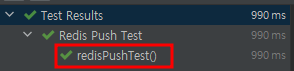
To check Redis data push, I wrote a test code as shown below and confirmed that the data was entered correctly.
package com.toco.trialService.connectionTest;
import com.fasterxml.jackson.core.JsonProcessingException;
import com.fasterxml.jackson.databind.ObjectMapper;
import com.fasterxml.jackson.datatype.jsr310.JavaTimeModule;
import com.toco.trialService.entity.Categories;
import com.toco.trialService.repository.CategoriesRepository;
import com.toco.trialService.repository.redis.CategoriesRedisRepository;
import io.lettuce.core.RedisClient;
import io.lettuce.core.api.StatefulRedisConnection;
import io.lettuce.core.api.sync.RedisCommands;
import org.junit.jupiter.api.AfterEach;
import org.junit.jupiter.api.BeforeEach;
import org.junit.jupiter.api.DisplayName;
import org.junit.jupiter.api.Test;
import org.junit.jupiter.api.extension.ExtendWith;
import org.springframework.beans.factory.annotation.Autowired;
import org.springframework.boot.test.autoconfigure.jdbc.AutoConfigureTestDatabase;
import org.springframework.boot.test.autoconfigure.orm.jpa.DataJpaTest;
import org.springframework.test.context.junit.jupiter.SpringExtension;
import java.util.List;
import static org.springframework.test.util.AssertionErrors.assertTrue;
@ExtendWith(SpringExtension.class)
@DataJpaTest
@DisplayName("Redis Push Test")
@AutoConfigureTestDatabase(replace = AutoConfigureTestDatabase.Replace.NONE)
public class RedisPushTest {
@Autowired
private CategoriesRepository categoriesRepository;
@Autowired
private CategoriesRedisRepository categoriesRedisRepository;
private RedisClient redisClient;
private StatefulRedisConnection connection;
private RedisCommands redisCommands;
@BeforeEach
public void beforeConnectDatabase(){
redisClient = RedisClient.create("redis://localhost:6379");
connection = redisClient.connect();
redisCommands = connection.sync();
}
@AfterEach
public void afterConnectDatabase(){
//redisCommands.expire("categories",10);
connection.close();
redisClient.shutdown();
}
@Test
public void redisPushTest() throws JsonProcessingException {
List categories = categoriesRepository.findAll();
categoriesRedisRepository.saveAll(categories);
assertTrue("TRUE", categories.equals(categoriesRedisRepository.findAll()));
}
} 
In this code, the value was entered into Redis as an entity using @RedisHash.
During the testing process, I tried changing Object to String, but there was a problem with jackson-datatype deserialization. For those who want to input data as json, I have written a detailed solution in the post below. I hope this helps people experiencing the same problem.
Nonononon Consideration based on Redis Caching strategy
Is it right to use this as a caching strategy?
I think I had to worry about this the most while creating the project.
I had a lot of concerns about how to use Redis Caching. The method will vary depending on the business and service, but the project I want to create now needs to provide concurrency, and I wanted to prevent data loss as much as possible, so the method I chose was Write-Through.
However, there is also a Write-Behind method, and in this case, the possibility of loss must be considered when processing large volumes of services. Since the RDBMS data may not be up to date, a method of regularly pushing the RDBMS data into in-memory is used.
Depending on the caching strategy, having unnecessary cache data can lead to memory waste and thus reduce performance.
Therefore, only key data (that does not generate many UPDATEs) required for proper TTL processing and performance improvement were used after @RedisCache processing. In this project, it was applied only to items that are not expected to have many updates, such as Program, ProgramDetail, and Categories.