[HTML/CSS] My Quick Reference for Core Basics
1. CSS application priority
① !important
|
1
2
3
4
5
|
div {
color: red;
border: solid 5px blue;
background-color: #cce6ff !important;
}
|
cs |
② Given directly to the corresponding tag → inline method
|
1
|
<div style="border: solid 1px red; background-color: #ffffcc; font-size: 40pt;">Hello, world@ @T130@@/div>
|
cs |
③ Style tag given in HTML file → Embedded Method
|
1
|
<style type="text/css"@ @T180@@></style>
|
cs |
④ External css file
|
1
|
<link rel="stylesheet"@@T233 @@ href="mycss.css">
|
cs |
2. Tag display method
Display methods typically include block and inline methods.
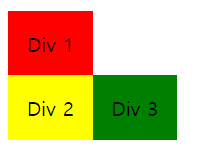
block method tags are inline method tag is The display method of a given tag can be changed, and can be changed to block-inline method and float property . Even if the entire float is set to left by embedding in html, if close: left is applied inline to the corresponding tag according to CSS priority, the influence of float will be removed from that tag. (close: left is applied to the div2 tag in the photo below)
3. Width settings to create a responsive web 4. 태그의 display 방식 display 방식은 대표적으로 block 과 inline 방식이 있다. block 방식 태그 : article, div, h1~h5, header, hr, table, footer, aside, p 등 inline 방식 태그 : a, input, span, select, img, label 등 - inline 은 width 및 height 적용이 안된다. 5. Semantic tag 7. line-height and vertical-align, text-align inline element has heights content-area and line-height height. In other words, line-height is not simply determined by font-size. The content-area is located in the center of the line-height. height If the value is auto, lihe-height is used, and in this case, content-area is the same as line-height. Changes in margin and padding have no effect, but when the display is line-block, padding, margin, and border increase the height and thus have an effect. (→ Detailed explanation and source) css, vertical-align may not be applied, because it may be applied differently depending on the font and line-height. Basically, content-area changes occur for each font and depending on the application environment (browser, etc.). At this time, the case where sufficient inline box where vertical-align can be applied must be considered. vertical-align is CSS applied to inline elements. (→ Detailed explanation and source) vertical-align is based on vertical alignment. text-align The alignment standard is horizontal. vertical-align is applied when the content is within the 8.
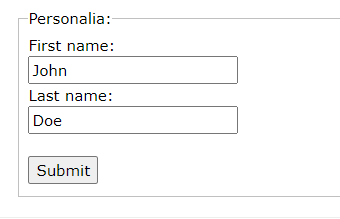
tag and tag input can be received using for in the label. In other words, if you select the word label type of animal, such as autofocus, you can make the cursor go to the tag. required enables submit execution only when the value of input is selected. autocomplete is the autocomplete function. + Use tags tags 9. + 10.
alt can be used to write text to replace the photo, such as when there is no image file. The property that changes the image border properties is border-radius. Like margin, it can be transformed into px or % values in each direction. audio, controls mean sound control, autoplay means automatic play, and loop means repeat play. video tag is similar to the audio tag, but be careful when using browser support as a video insertion tag. And since inserting control tools is not possible in HTML5, it is recommended to add the controls attribute. 11. position Position can be given to each css element property value, and the types are as follows. ① static positioning Default value when no position is given. Even if top, down, left, and right values are not given separately, they are applied according to the default value or the properties of the parent tag. ② absolute positioning The value given as having an absolute value is converted to a % of the monitor size and does not follow the parent's properties. ③ relative positioning The standard as a relative position value is its own property and changes according to the positioning value. In other words, there is a change in the relative value compared to the value of static positioning. ④ fixed positioning A value that is not affected by mouse scrolling and is mainly used in cases such as creating a button to move to the top of a web page. The position is the position value of the currently visible monitor and is always fixed to the same position within the monitor when viewed by the user. 12. CSS property values according to state : link → Link status before visit : visited → Link status after visit : hover → Link status when mouse over : active → Link status when clicked 13. overflow This property sets how content that exceeds the size of the element will be displayed. overflow: visible shows all contents prioritizing their size overflow: hidden cuts the overflow content overflow: scroll creates a scrollbar even if the content does not overflow. overflow: auto causes a scrollbar to appear only when the content overflows. Things
cs
cs
tag or when the display method is set to table for the outside and table-cell for the inner tag. Please note that this applies
cs
Tag
is as shown in the code below. Here, using colgroup span allows you to group columns for CSS processing. If there are 5 columns, the value of 2 is given to the first span, and the next column where the value of 2 is given to the span refers to the 3rd and 4th columns in the table.
cs
or tags, colspan and rowspan indicate column merge and row merge, respectively.
Even without specifying each id or class value in the tag,
,
cs
cs