Understanding query tuning
7minDeadLock and Redis queues
11min[MySQL] Wanted Backend Onboarding Challenge February class content review
4min[MSSQL] TRANSACTION ISOLATION LEVEL
4min[Redis] About Redis - terminology, DB differences, data types, installation, and Spring Boot connection
6min[Redis] About Redis - terminology, DB differences, data types, installation, and Spring Boot connection

- Why did you decide to clean up Redis?
- Differences from other DBs
- Redis data types
- Glossary of terms related to Redis
- Corporate Redis application cases
- Install Redis and integrate with SpringBoot
Why did you decide to clean up Redis?
Redis first became more interested in SpringSession integration through 지마켓 기술블로그. So, I compiled articles on the blog to educate myself with the goal of installing it myself and applying it to my next toy project.
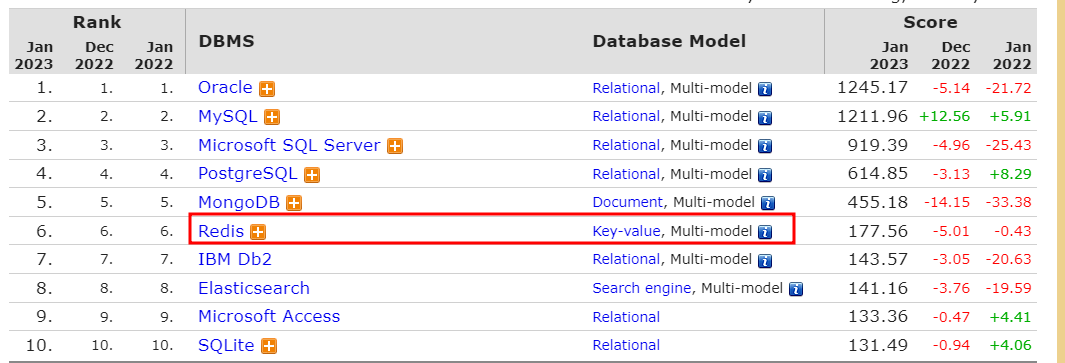
As can be seen in db-engines, Redis ranks 6th in popularity (as of January 2023).
As expected, the top rank is occupied by relational DB, and as can be seen in the picture, Redis belongs to the in-memory DB of key-value values. Since the in-memory structured database supports various data structures in NoSQL, it is advantageous to be able to store and use the database in a structured form, just as we use structures such as LIST and HASHMAP in languages such as JAVA.
There may not be a big advantage on a single server, but for programs running on multiple servers, securing data safety by sharing the same database Redis is a big advantage. For detailed use cases, please refer to the table of contents below.
Differences from other DBs
Relational databases (MySQL, MSSQL) store data on disk, but in-memory formats such as Redis store data in memory (RAM). In other words, the speed of reading or saving data is faster.
Because the cache method is used, there is no need to search and retrieve data from disk like a relational database. Additionally, the Expire function allows you to set an expiration date for each data to be stored in memory. And because it provides various data types, it improves development convenience.
Redis data types
It was mentioned briefly when explaining Redis above, but the advantage of diverse data structures was felt the most. As shown in the picture below, core data types include String, Lists, Sets, Hashes, Sorted sets, Hashes, Sorted sets, Streams, Geospatial indexes, Bitmaps, Bitfields, and HyperLogLog.
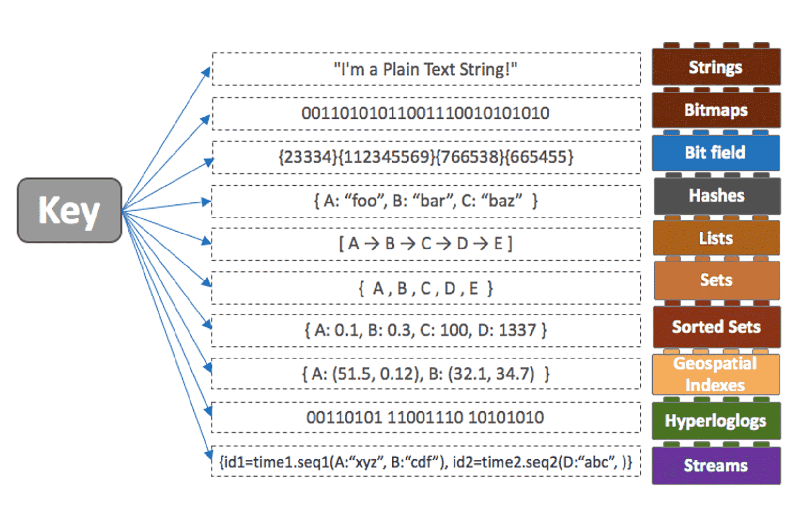
Most of the data structures here were similar to those seen in Java, and I only looked into a few data structures.
Grospatial index, as the name suggests, is a good structure for storing data about geographical locations. It is a type that stores latitude and longitude and is useful for understanding the geographical distance relationship of each location.
Hyperloglogs are data structures added as a way to estimate the number of elements in a set. It is an evolution of the previous LogLogCounting algorithm and does not store data, enabling fast calculations with a small memory. It is mainly used to obtain an approximation of very large data with an error of 1% or less. The commands PFADD to add elements, PFCOUNT to calculate the number of elements, and PFMERGE to combine two or more elements into one element are used.
PFADD members 123
PFADD members 500
PFCOUNT members
2
Glossary of terms related to Redis
Redis Cluster
It has at least 3 nodes in the form of a distributed server. It can be configured in a Master-Slave format with multiple Master servers and one or more Slaves per Master server.
Lettuce vs. Jedis
These are libraries that help you easily use Redis in Java. The blog compares and shows that Lettuce is superior in all areas of TPS/CPU/Connection. Lettuce is recommended for many reasons, including resource saving and updates. (see Jedis 보다 Lettuce를 쓰자 )
Corporate Redis application cases
유저 목록을 Redis Bitmap 구조로 저장하여 메모리 절약하기
This content uses the Bitmap structure instead of the Redis Set structure to save memory. According to the text, Remember stored the IDs of people who responded to the survey in Redis as a set and did not use them for anything other than surveys. We could see that memory consumption was clearly reduced by using Bitmap. However, keep in mind that if the amount of data is small and the offset is large, the memory consumption of Set may be smaller.
Baemin was using the Set data structure by setting key values to manage overall real-time inventory and real-time inventory per person. You can see that an asynchronous method has been adopted so that even if an event with an incorrect purchase number for inventory usage deduction is issued, it does not affect inventory usage deduction. However, since data loss can occur with Redis alone due to volatile data, you can see that inventory usage data is managed by syncing to RDB.
Install Redis and integrate with SpringBoot
First, download and install Redis-x64-3.0.504.msi for installation. (Based on Windows) There was nothing else to do other than setting the path or port, so I did not capture it. If you click Next and proceed with the installation, the Redis installation will simply be completed.
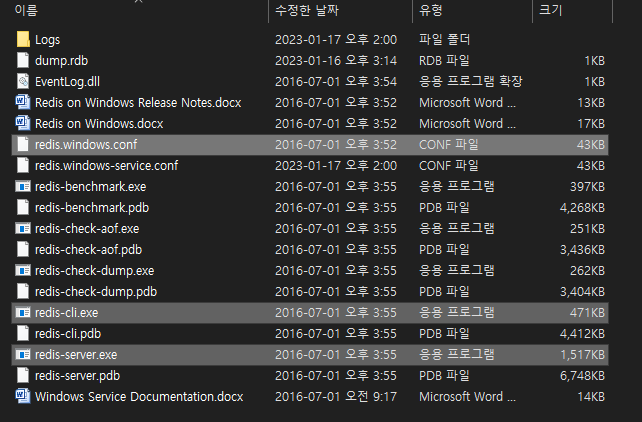
If Redis is set to the default path, the installed location is C:\Program Files\Redis. Here, the Redis folder is as shown below, and I think you should first look at the blocked files.
Click redis-server.exe to start the server.
redis-cil.exe can be viewed as a cmd window that we select and enter commands when using Redis.
redis.windows.conf is a file that allows settings such as port, bind settings, and log settings. Just uncomment it, save it, and then restart to use it.
To check whether Redis was installed properly, I entered a few commands and checked whether the values were saved. You can see that the data is confirmed well by simply setting and getting the value.
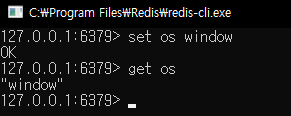
Now, let’s use Redis in conjunction with Spring boot. I connected Redis using Lettuce. The files and code for the integration test are as follows.
build.gradle
In the settings section, dependecies are not required for this integration test, but there are pre-set values for future projects, so they are commented out.
plugins {
id 'java'
id 'org.springframework.boot' version '2.4.4'
id 'io.spring.dependency-management' version '1.1.0'
}
group = 'test.guide'
version = '0.0.1-SNAPSHOT'
sourceCompatibility = '11'
repositories {
mavenCentral()
}
dependencies {
implementation 'org.springframework.boot:spring-boot-starter-web'
//implementation 'org.springframework.boot:spring-boot-starter-security'
implementation 'org.springframework.boot:spring-boot-starter-data-redis'
//implementation 'org.springframework.session:spring-session-core'
implementation 'org.springframework.session:spring-session-data-redis'
implementation 'io.lettuce:lettuce-core:6.2.2.RELEASE'
testImplementation 'org.springframework.boot:spring-boot-starter-test'
}
tasks.named('test') {
useJUnitPlatform()
}
application.properties
If you use the default port locally in the properties settings section, just set it the same way.
spring.redis.host=localhost
spring.redis.port=6379
SessionConfig.java
I set the config to get the property value with @Value and set the redisTemplate. Here, we will simply substitute key and value using StringRedisTemplate.
package test.guide.springSession.config;
import org.springframework.beans.factory.annotation.Value;
import org.springframework.context.annotation.Bean;
import org.springframework.context.annotation.Configuration;
import org.springframework.data.redis.connection.RedisConnectionFactory;
import org.springframework.data.redis.connection.lettuce.LettuceConnectionFactory;
import org.springframework.data.redis.core.RedisTemplate;
import org.springframework.data.redis.core.StringRedisTemplate;
import org.springframework.data.redis.repository.configuration.EnableRedisRepositories;
import org.springframework.data.redis.serializer.StringRedisSerializer;
import org.springframework.session.web.context.AbstractHttpSessionApplicationInitializer;
@Configuration
@EnableRedisRepositories
public class SessionConfig extends AbstractHttpSessionApplicationInitializer {
@Value("${spring.redis.host}")
private String redisHost;
@Value("${spring.redis.port}")
private int redisPort;
@Bean
public RedisConnectionFactory redisConnectionFactory(){
return new LettuceConnectionFactory(redisHost,redisPort);
}
@Bean
public RedisTemplate redisTemplate(){
RedisTemplate redisTemplate=new RedisTemplate<>();
redisTemplate.setConnectionFactory(redisConnectionFactory());
redisTemplate.setKeySerializer(new StringRedisSerializer());
redisTemplate.setValueSerializer(new StringRedisSerializer());
return redisTemplate;
}
@Bean
public StringRedisTemplate stringRedisTemplate(){
StringRedisTemplate stringRedisTemplate=new StringRedisTemplate();
stringRedisTemplate.setKeySerializer(new StringRedisSerializer());
stringRedisTemplate.setValueSerializer(new StringRedisSerializer());
stringRedisTemplate.setConnectionFactory(redisConnectionFactory());
return stringRedisTemplate;
}
}
SpringSessionApplicationTest.java
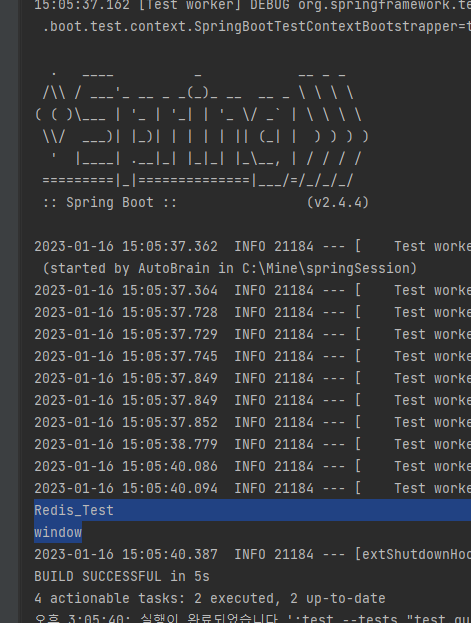
I wrote code for testing. You can see that it works well as shown in the picture below. To check after installation, you can see that the key value entered by redis-cil.exe and the window value of "os" are output.
package test.guide.springSession;
import org.junit.jupiter.api.Test;
import org.springframework.beans.factory.annotation.Autowired;
import org.springframework.boot.test.context.SpringBootTest;
import org.springframework.data.redis.core.StringRedisTemplate;
import org.springframework.data.redis.core.ValueOperations;
@SpringBootTest
class SpringSessionApplicationTests {
@Autowired
private StringRedisTemplate redisTemplate;
private final String KEY="keyword";
@Test
public void test(){
String keyword="Redis_Test";
ValueOperations rt = redisTemplate.opsForValue();
rt.set(KEY, keyword);
System.out.println(rt.get(KEY));
System.out.println(rt.get("os"));
}
}