[Java] Applied For Loop and Nested For Loops
Example 1 - Printing a string
Write a string and write a for statement that outputs the string up to the number in the string.
//Use the string ch in the result value to accumulate and output each index.
|
1
2
3
4
5
6
7
8
9
10
11
12
13
14
15
16
17
18
|
String word = "sup3er007Man";
String result = "";
int i=0;
//Arrangement solution to consider!
for (; i<word.lengt i++) {
|
|
break; //i => 5, string is the same length as
{
|
}
}
System.out.print(" \n1. Output string up to the first place where a number appears => "+result);
System.out.println(@@T183 @@"\n1. String length up to the first digit => "+i);
|
cs |
Example 2 - Printing a list of odd-numbered English characters
★Using the ternary operator
Since "," should not appear at the end of a list of odd-numbered English characters, use the ternary operator to remove the number in that case. Since even-numbered characters are not output, the method i%2==0 is used to exclude them. And write continue; to prevent the code below from being executed.
|
1
2
3
4
|
for(i=@@T2 51@@'a';i<'z'@@T258@ @+1;i@@T266 @@++) {
| 1@@=0) continue;
| @T301@@'z'-@@T307@ @1)?",":"";
System.out.print@ @T320@@((char)i+str);
|
cs |
Example 3 - Finding the sum of odd or even between input values
if If i is a multiple of 2, add it to the sum of odd numbers as follows. And in else, add it to the sum of even numbers.
|
1
2
3
4
5
|
for(int i=firstNo;i<=secondNo;i++) {
if(i%2 == 0) {
holSum += i;
continue;
} else jjakSum += i;;
|
cs |
예제4 - 구구단 출력하기
레이블 활용하기
break; 문이 두 개 이상일 때, 기본대로 가장 가까운 반복문을 빠져나가는 것이 아니라 원하는 반복문의 탈출로 사용하고자 한다면 레이블을 사용한다. For 문 위에 레이블명: 을 작성하고 break 레이블명; 을 작성한다.
구구단 출력코드 작성에 발생할 수 있는 문제의 모든 경우의 수를 생각해보자.
1. 먼저 구구단을 입력하라고 했을 때, 정수형으로 2~9 사이의 숫자가 아닌 문자, 실수, 그 외 정수형이 입력되는 경우는 배제
2. 구구단 출력 후 다시 구구단 프로그램을 실행할 것인지 여부 확인하기.
이 때, y 나 n 이 아닌 다른 문자, 숫자, 실수가 입력되는 경우는 배제해야 한다. 그리고 대소문자의 여부와 관계없이 출력해야 하므로 .equalsIgnoreCase() 값을 이용해서 작성한다.
//To prevent scanner leak;, it is efficient to prevent unnecessary memory waste by placing break; in a duplicate loop statement above the statement.
|
1
2
3
4
5
6
7
8
9
10
11
12
13
14
15
16
17
18
19
20
21
22
23
24
25
26
27
28
29
30
31
32
33
34
35
36
37
38
39
40
41
42
43
44
45
46
47
48
49
50
51
|
package my.day07.b.FOR;
import java.util.Scanner;
public class GuguDan1Main { //Creating a multiplication table considering the number of cases
public static void main(String[] args) {
Scanner sc = @@T681@ @new Scanner(System.in);
… outer: // outer: is called a label, but the label name is now just outer.
for(;;) {
try {
System.out.print("몇 단 볼래? =>"); @@
String strDan = sc.nextLine();
int Dan = Integer.parseInt(strDan);
if(1<Dan& &Dan<10) {
System.out.println(”==== +Dan+"단 ===");
i@@ 89@@<10;i@@T796 @@++) { System.out.@@T80 9@@println(Dan+"*"@@T817 @@+i+”=" +Dan*i);
}
for(;;) {
System.out@@T848@ @.print(">> 또 하시겠습니까? [Y/N] => ");
String yn = sc.nextLine();
if ("N".@@T869 @@equalsIgnoreCase(yn)) { //Case insensitive
System.out@@ T878@@.println("== End program ==");
sc.close();
break outer; // You must exit the outermost for statement.
… // outer is the label name.
… else if@@T900 @@ ("Y".equalsIgnoreCase(yn)) {
break;
… else System.@ @T91 5@@out.println(">>> Y or N only <<<");
}//end of for ------------------------------------------------
… else
System.out. println(">>> Only available from 2nd to 9th steps <<<");
{catch (NumberFormatException e) {
System.out.@@ T955@@println(">>> Only available from 2nd to 9th steps <<<");
}
//sc.close(); Put it before break;
}//end of for-------------------------------------------------
{ }
}
|
cs |
Example 5 - Printing the entire multiplication table
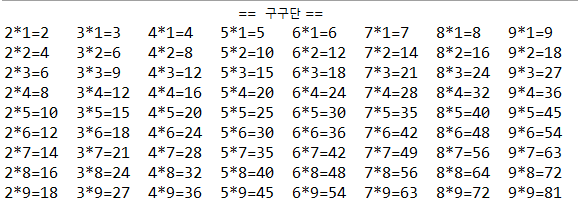
Matrix
When the value to be output is in matrix form, use an array. You can also output a matrix format using a nested For statement. (row is written as a row, col is written as a column)
printf
Format specifier can be specified for printing.
System.out.printf("%35s\n","== multiplication table =="); As in, %s is a specifier that outputs a String string, and by writing a number after %, you can arrange the string with a space as the left alignment standard. To right align, use a negative number. You can specify the output location of the output value.
|
1
2
3
4
5
6
7
8
9
10
11
|
public static void main(String[] args) {
System.out.printf("%35s\n","== multiplication table ==");
for (int row@@T 1111@@=1; row@ @T1118@@<10; row@@T1124@ @++) {
for (int col=2; col<10; col++) {
System.out.printf(col+"*"+row+"=%-4d",(row*col));
}
System.out.print("\n");
}
}
|
cs |
다중 For 문의 활용
5*5 행렬 형태에서 4행, 4열을 빼고 작성하고자 하는 경우에는 다음과 같이 if 문의 continue; 으로 해당 행렬 부분을 빼고 출력이 가능하다.
|
1
2
3
4
5
6
7
8
|
for (i=5; i>0 ;i--) {
if(i==4) continue;
for (j=1; j<6; j++) {
if(j==4) continue;
System.out.print(i+"0"+j+"호\t");
}
System.out.print("\n");
}
|
cs |