[Today’s Coding] Step6. Backend - Apply Swagger and modify ERD
‘Today’s Coding’ mailing service made with JAVA 17, Spring Boot 3.0.2, Gradle, MySQL, and Redis

I was planning to write a blog post by tying the main page into one step, but I thought it would be easier to bring the list of services shown at the bottom to the backend and process the front at once rather than just creating the entire front, so I wrote it in separate steps to explain adding data to the backend and setting up Redis.
This page can be said to be a consideration log containing how to reflect the concerns considered before proceeding with Step 7 in the design. I wrote this in the hope that those who are reading this will succeed in designing their project at once.
Swagger application for Rest API specification
A part that cannot be explained without leaving out backend development is the Rest API. Swagger processing was performed to facilitate output of the final API specification. We plan to implement/organize the reporting API during development.
How to use Swagger UI
Rest API implementation using swagger can be done by adding dependencies, setting SwaggerConfig, and annotating the specification with @ApiOperation.
First, add dependencies to build.gradle of the spring project. I used the 2.x.x version because I only need the specification list, and the latest version is called 4.18.0.
implementation group: 'io.springfox', name: 'springfox-swagger2', version: '2.9.2'
implementation group: 'io.springfox', name: 'springfox-swagger-ui', version: '2.9.2'
And you need to create a config file to be ready to use swagger UI.
The thing to be careful about here is that an error may occur if you only process @Configuration in front of the class. Here, you must use @EnableWebMvc together to use it in SpingMVC. Alternatively, some people solved it by only applying @EnableSwagger2.
package com.toco.trialService.config;
import springfox.documentation.builders.ApiInfoBuilder;
import springfox.documentation.builders.PathSelectors;
import springfox.documentation.builders.RequestHandlerSelectors;
import springfox.documentation.service.ApiInfo;
import springfox.documentation.spi.DocumentationType;
import springfox.documentation.spring.web.plugins.Docket;
import springfox.documentation.swagger2.annotations.EnableSwagger2;
@Configuration
@EnableSwagger2
@EnableWebMvc
public class SwaggerConfig {
private static final String SERVICE_NAME = "Today Coding";
private static final String API_VERSION = "v1.0.0";
private static final String API_DESCRIPTION = "Today Coding API";
private static final String API_URL = "http://localhost:8080/";
public Docket swagger(){
return new Docket(DocumentationType.SWAGGER_2)
.apiInfo(apiInfo())
.select()
.apis(RequestHandlerSelectors.any())
.paths(PathSelectors.any())
.build();
}
private ApiInfo apiInfo() {
return new ApiInfoBuilder().title(SERVICE_NAME)
.version(API_VERSION)
.description(API_DESCRIPTION)
.termsOfServiceUrl(API_URL)
.licenseUrl("/")
.build();
}
}
To annotate the specification with @ApiOperation, simply annotate the @[xxxxx]Mapping processing part above each controller method. If I do this to all controllers now, the code won't look clean, so I decided to apply this part right before printing the specifications.
@ApiOperation(value="로그인", notes="로그인 기능")The result of additional ERD revisions, revisions, and revisions...!
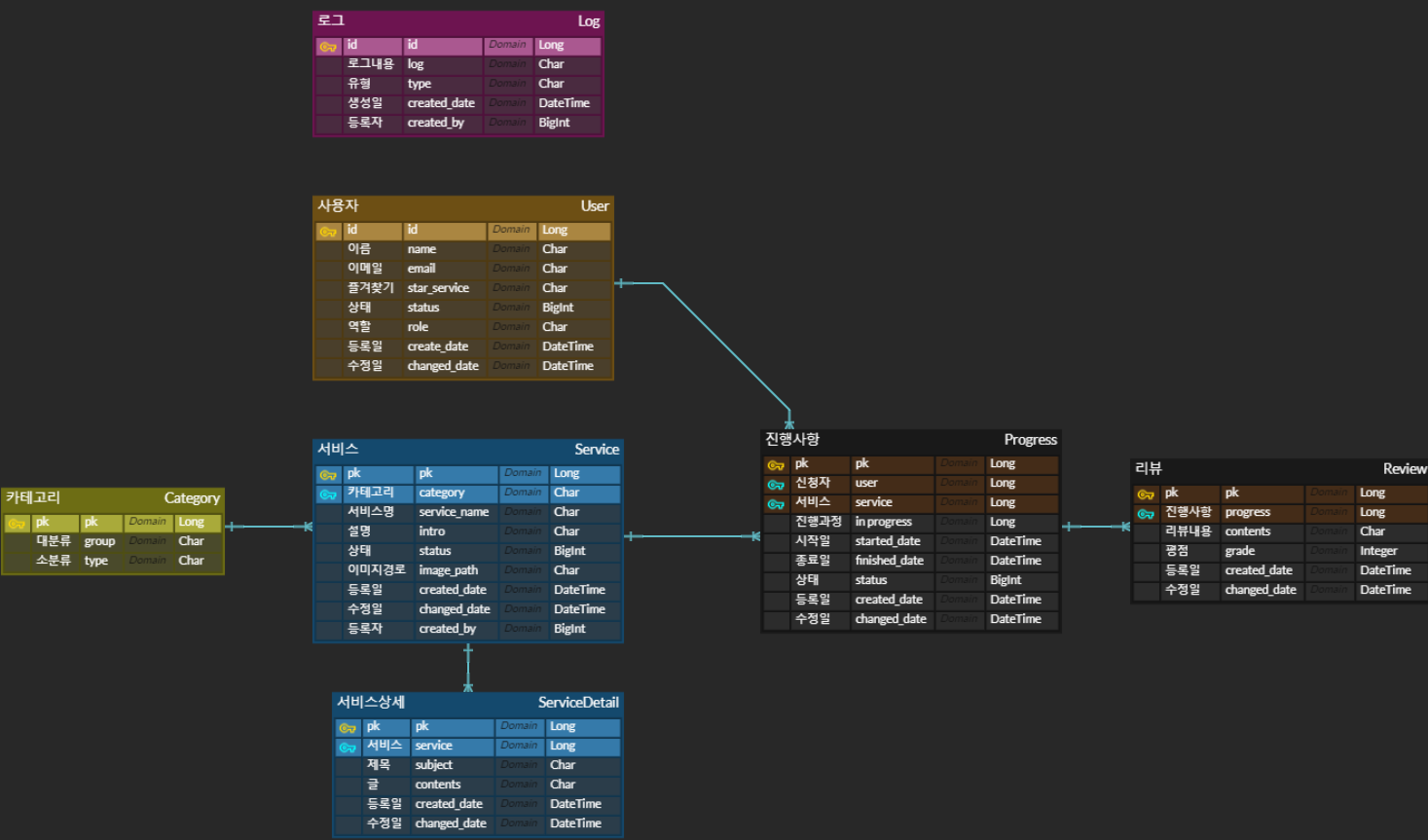
I tried modifying the ERD again. I briefly summarized the things I thought about while editing.
The more I think about it, the more features I want to do, but I decided to stop being greedy and provide only this level of good service, so I'm going to stuff it on this page.
1. Image path for each service is required
Now that I think about it, creating each banner image seems like work. There are at least 6 images on the main page + 6 images on each detail page, so I need to think more about creating images for each service. First, I think I'll have to go through the process of creating it using a sample image, loading it on my computer, and applying it.
Because the image source needs to be stored, the image_path column for source connection was added to the existing service table.
2. Addition of common entities
And since there may be cases where the registration date and modification date are needed in each table, a column for setting commonly used BaseEntity was added.
3. Let’s use enum well vs. Let’s create a convenient maintenance service
Due to the nature of this project service, it was necessary to subdivide and manage each service category. I was wondering whether to put the service category in the db and allow the administrator to maintain it directly, or to just assume that I am the administrator and divide the enum into major and minor categories as shown below and manage it as a list.
The conclusion was to proceed with DB processing for maintenance later. It's a good project to show off, but since people can actually use it later, I thought I should create a convenient function for all stakeholders, so I created a category table.
public enum Category {
CS("컴퓨터 상식", Arrays.asList(Service.CS, Service.TREND)),
Language("언어", Arrays.asList(Service.C1, Service.C2, Service.C3, Service.JAVA, Service.JS, Service.HTML_CSS, Service.PYTHON, Service.GO)),
Framework("프레임워크", Arrays.asList(Service.SPRING, Service.DJANGO));
private final String name;
private final List services;
Category(String name, List services) {
this.name = name;
this.services = services;
}
public String getName() {
return name;
}
}
public enum Service {
CS("CS"),TREND("TREND"),
JAVA("JAVA"), PYTHON("PYTHON"), C1("C"), C2("C++"), C3("C#"), JS("JS"), HTML_CSS("HTML/CSS"), GO("GO"),
SPRING("SPRING"), DJANGO("DJANGO"),
Architecture("Architecture"), API("API"),
MSSQL("MSSQL"), MYSQL("MYSQL"), MARIADB("MARIADB"), ORACLE("ORACLE"),
KUBERNETES("KUBERNETES"), DOCKER("DOCKER");
private final String Name;
Service(String name){
this.Name = name;
}
public String getName() {
return Name;
}
}4. Changes in relationship mapping
I deleted the mapping of parts where I thought there was no need for a correlation. In the case of logs, I didn't map it because I didn't think there was much reason to pull all the information of the registrant(?), that is, the person who logged in. Additionally, the mapping of the previously existing circular structure was changed to enable one-way setup. (User, Service, Progress part)
The product of such reflection..!