Google Colab CLI: Notebooks Finally Meet the Terminal
Google Colab has long occupied an interesting position in the machine learning ecosystem. It's free, it runs in a browser, and it comes with GPU access that would otherwise cost real money. But it has always carried an implicit tax: you had to live inside the browser to use it. Automating notebook runs, integrating Colab into CI pipelines, or even just checking whether a runtime was still alive required workarounds — unofficial APIs, hacky scripts using Selenium, or giving up and switching to a different platform.
The Colab CLI changes that calculus. Google's announcement brings a proper command-line interface to Colab, letting developers interact with notebooks, runtimes, and cloud resources from the terminal. It's not a dramatic reimagining of the product — it's more like filling a hole that should have been filled a long time ago.
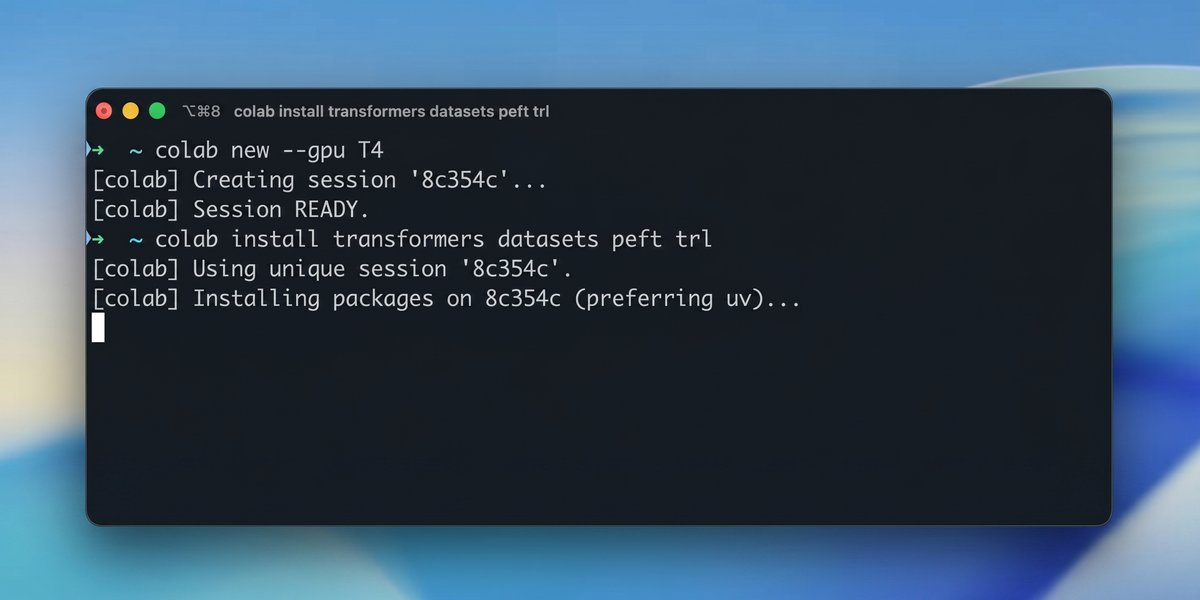
What the CLI Actually Does
At its core, the Colab CLI exposes the things you'd want to script: starting and stopping runtimes, executing notebooks non-interactively, uploading and downloading files, and checking runtime status. The interface follows the pattern established by tools like the gcloud CLI — subcommands, flags, output formats you can pipe into jq. If you've ever used the Google Cloud SDK, the muscle memory transfers.
What's notable is that this isn't just a thin wrapper around browser automation. It uses proper OAuth credentials and hits the Colab API directly, which means it works reliably in headless environments — GitHub Actions, local cron jobs, an SSH session on a remote machine. The authentication story is clean enough that you can hand off a notebook execution to a CI pipeline without embedding credentials in awkward ways.
Why This Matters More Than It Sounds
Reproducibility has always been the Achilles' heel of notebook-based workflows. A notebook that runs fine in a browser session on Tuesday may produce different results on Thursday because someone changed a cell, the runtime restarted mid-session, or the package versions drifted. The Colab CLI makes it practical to run notebooks as part of a controlled pipeline — same environment, same execution order, logged output — which pushes Colab meaningfully closer to being a reproducible compute substrate rather than an interactive scratch pad.
There's also a collaboration angle. Teams that use Colab heavily have always had to reconcile the just open it in a browser culture with the need for structured ML workflows. With a CLI, a team lead can wire up notebook execution to a shared trigger — a GitHub push, a scheduled job, a manual dispatch — without asking everyone to manage their own browser sessions. The notebook becomes an artifact that a pipeline owns, not just a tab someone has open.
For solo practitioners, the value is quieter but real. You can kick off a long training run from your laptop terminal, close the browser, and check back via the CLI to see if the runtime is still alive. That alone removes a specific category of anxiety that comes with expensive GPU sessions: the compulsive tab-checking that accomplishes nothing but interrupts other work.
Where This Leaves the Colab Positioning
Google has been threading a careful needle with Colab. The free tier competes with nothing — it's genuinely useful for learning and prototyping. The Colab Pro and Pro+ tiers compete with Modal, Lambda Cloud, and self-managed GPU instances. The CLI doesn't change the pricing, but it does change the value proposition of the paid tiers: now you're not just buying compute, you're buying compute that can slot into real workflows.
The honest comparison is with Paperspace Gradient or Kaggle Kernels or even JupyterHub — all of which have had CLI or API access for some time. Colab is catching up, not leaping ahead. But catching up to table stakes is sometimes enough, especially when you have Google's distribution and the Colab brand's familiarity with the research community. Many teams that would never seriously consider switching away from Colab have nonetheless been maintaining parallel environments just for automation. The CLI collapses that duplication.
The announcement also signals something about Google's broader strategy for Colab: they're treating it as a platform, not just a consumer product. CLI access is infrastructure thinking. It suggests Colab is being positioned as a component in larger systems, not just an endpoint where people open notebooks and run cells. That's a different bet than the one Google made when Colab launched.
What to Take From This
If you've been avoiding Colab for production-adjacent work because it felt too browser-bound, the CLI is worth revisiting. The gap between Colab and a more scriptable compute environment has narrowed. Whether it narrows enough depends on your specific workflow — but the direction is clear, and the friction points that caused the most workarounds are now addressed directly.
The deeper takeaway is that the line between interactive notebooks and production pipelines keeps blurring. Tools like the Colab CLI are part of that drift. Notebooks aren't just for exploration anymore; they're increasingly how computation gets specified, shared, and executed at scale. The CLI is evidence that even Google now treats that as the default assumption — and it's the right one.