Flutter review
About Flutter
Flutter is a cross-platform UI framework created by Google, and its feature is that it can be developed for iOS, Android, Web, and Desktop with a single code base. Because it uses its own graphics engine (Skia, Impeller), there is not as much difference in UI between platforms as in the existing hybrid method, and rendering performance is excellent. Skia supports vector-based rendering, and Impeller supports high-performance rendering utilizing the latest GPU performance. The hot reload function immediately reflects the modified content by re-calling the build() method starting from the top-level widget without rebuilding the entire screen when the code is modified during the development process. Hot Reload updates only the UI while maintaining the state, and Hot Restart initializes the state as well. Flutter supports both JIT and AOT. In the development stage, quick reflection is possible through JIT compilation, and in the distribution stage, it is converted to native machine code through AOT compilation, resulting in fast execution speed. Dart VM executes bytecode or converts it into optimized machine language and processes it.
pubspec.yaml | pubspec.lock | analysis_options.yaml
pubspec.yaml
This is the core configuration file of the project and is responsible for adding package dependencies, version management, assets, and fonts settings. External packages are managed in pub.dev, and are installed by executing flutter pub get after declaring them in pubspec.
pubspec.lock
It records the exact version of the actually installed package and prevents version conflicts. It is automatically created and updated when flutter pub get is run without the developer directly modifying it.
analysis_options.yaml
This is a configuration file that defines the code analyzer and Lint rules. These are important for maintaining project consistency, including checking null safety, enforcing code style, and ignoring unnecessary warnings.
MaterialApp | CupertinoApp | Scaffold
###MaterialApp MaterialApp is the top-level app widget that makes up the “overall framework” of a Flutter app and can define colors, font styles, and widget themes that are reused throughout the app. In addition, it combines Navigator and Route to comprehensively handle screen transitions and navigation methods within the app.
CupertinoApp
CupertinoApp has the same functional location as MaterialApp, but its UI components are designed to follow the iOS style. Like MaterialApp, it acts as a higher-level controller that manages the theme and routing of the entire app. Depending on the platform, a mixture of Material and Cupertino widgets may be used.
Scaffold
Scaffolds are widgets that form the basic framework of a single screen within the context of Material Design. It provides a structural framework for arranging individual screen (UI) elements such as AppBar, Drawer, FloatingActionButton, BottomNavigationBar, and SnackBar. In other words, if MaterialApp is the operating system for the entire app, Scaffold is close to a ‘page layout template’ for each individual screen. Scaffold can be set differently for each screen, and it is common for a new scaffold to be created every time the screen is switched.
Main widgets
- SafeArea corrects the padding considering the notch area that differs for each device.
- DevTools provides UI structure checking, layout debugging, performance tracking, etc.
- Expanded is a widget that forces children to occupy the remaining space provided by the parent. Together with Spacer, it helps control area proportions in the layout. Spacer is actually an abbreviated form of Expanded for easier use.
class Spacer extends StatelessWidget {
const Spacer({ Key? key, this.flex = 1 }) : super(key: key);
final int flex;
@override
Widget build(BuildContext context) {
return Expanded(
flex: flex,
child: const SizedBox.shrink(),
);
}
}
- SizedBox acts as a spaced or fixed size box.
- AppBar represents the top area UI and provides various properties such as leading, title, and actions.
StatefulWidget vs StatelessWidget
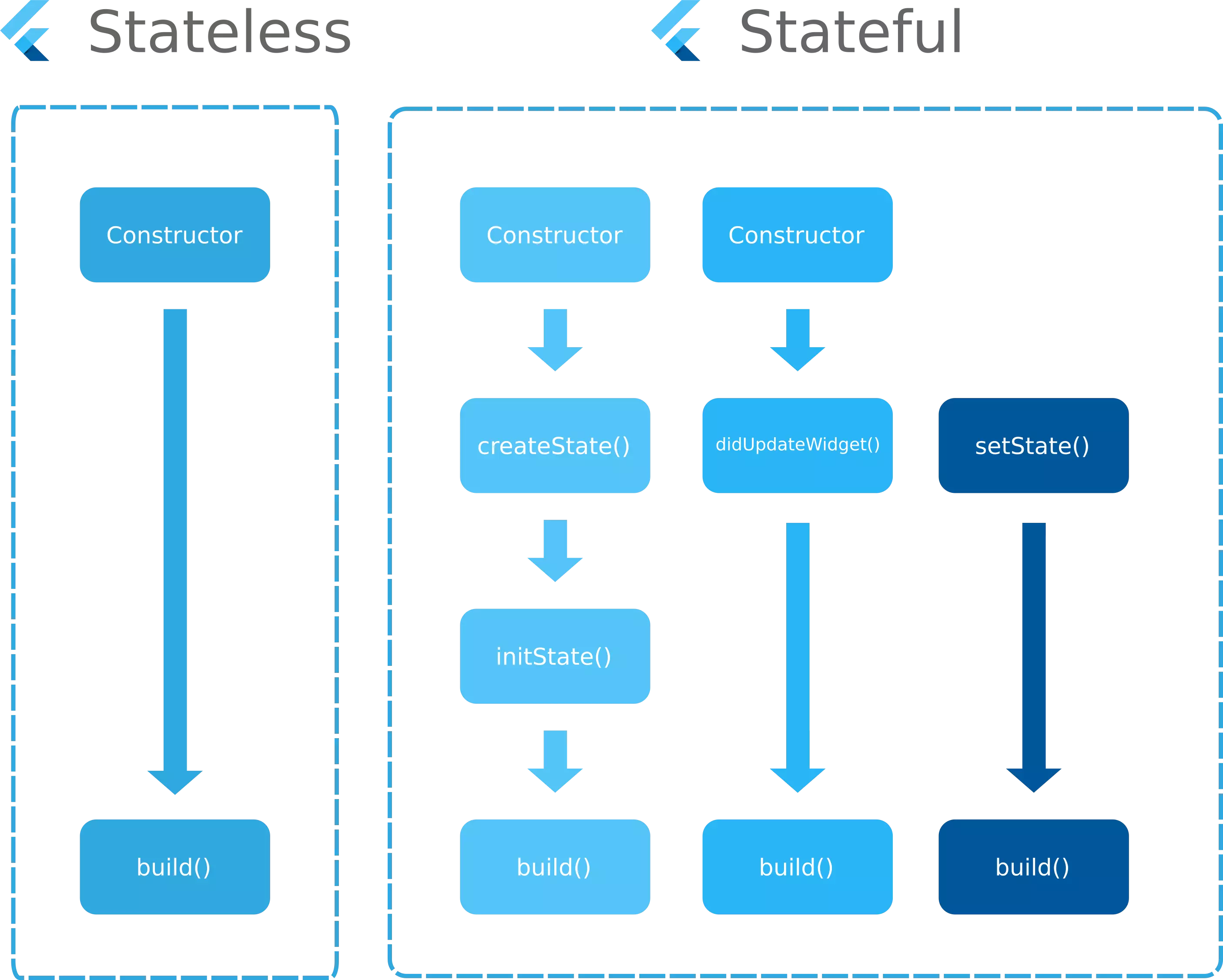
StatelessWidget only expresses UI without changing state. StatefulWidget is used when the screen needs to be updated through setState. When the state becomes complex, it is common to use state management tools such as Riverpod.
import 'package:freezed_annotation/freezed_annotation.dart';
part 'user.freezed.dart';
part 'user.g.dart';
@freezed
class User with _$User {
const factory User({
required int id,
required String name,
String? email,
}) = _User;
factory User.fromJson(Map<String, dynamic> json) => _$UserFromJson(json);
}
MVVM architecture
View is responsible for UI, ViewModel is responsible for state management/data processing, and Model is responsible for actual data structure and Repository. Reduces coupling and makes testing easier.
- Model is a layer that contains the actual data and business rules of the app. The actual logic, such as API communication, database access, data conversion, and validation, is handled here.
- View is a screen element displayed on the screen and is the UI layer with which the user interacts. In Flutter, all widgets that draw the screen belong to the View area. View does not directly manage state, but passes user events (button click, scroll, etc.) to ViewModel, and only receives and renders the state provided by ViewModel.
- ViewModel acts as an intermediate bridge between View and Model. It receives user input from the View, calls the Model to retrieve or save data, and processes the results into a form that the View can use. The ViewModel contains the behavior of the UI, but does not contain the UI itself.
- ViewModel → View: Status update (reflected in observer/state management method) Because Flutter does not have an officially fixed architecture, MVVM can be implemented in a variety of ways.
- The most common approach is to use ChangeNotifier and Provider, where ViewModel inherits ChangeNotifier to manage state and View subscribes to it through ChangeNotifierProvider or Consumer. Because the structure is simple and intuitive, it is especially used in small and medium-sized apps.
- Riverpod is considered an improved version of Provider and has the advantage of being able to handle global scope and dependency injection more cleanly and making it easier to test. In this case, the ViewModel can be implemented based on StateNotifier or AsyncNotifier to form a clearer state flow.
- The Bloc pattern operates based on events, and can be understood as a structure in which ViewModel performs the role of Bloc. Because each state and event are clearly distinguished and highly predictable, it is especially powerful in large-scale apps or projects dealing with complex states.
Dio library
Dio is one of the most widely used HTTP client libraries in the Flutter/Dart ecosystem. It is possible to automate header settings and structure error handling through BaseOptions, Interceptors, etc. In addition to simple requests, it supports interceptors, file uploads, request cancellation, retries, and global settings.
Geolocator
It is a library that receives the user's current location (GPS) and location change stream, and helps to easily handle distance calculation, permission management, etc. While Geolocator is optimized for acquiring the current location, the difference in the case of Google Maps API is that the location must be obtained separately, focusing on map rendering. Below is a sample code using Geolocator that detects location changes based on the current position.
StreamSubscription<Position>? positionStream;
void startListening() {
const locationSettings = LocationSettings(
accuracy: LocationAccuracy.high,
distanceFilter: 10,
);
positionStream = Geolocator.getPositionStream(locationSettings: locationSettings)
.listen((Position? position) {
print(
'위치 업데이트: ${position?.latitude}, ${position?.longitude}');
});
}
void stopListening() {
positionStream?.cancel();
}
Real-time communication (WebSocket)
SocketJS provides fallback even in environments where WebSocket support is difficult. STOMP is a text-based message protocol and is suitable for real-time communication with a subscription/publishing structure.
Animation implementation
In Flutter, animation is largely divided into implicit and explicit methods. Implicit animation is simple to implement because Flutter automatically processes the animation by simply changing the property values of the widget, such as AnimatedContainer and AnimatedOpacity. On the other hand, explicit animation uses AnimationController and Tween to directly control detailed movements such as animation speed, curve, and number of repetitions, enabling more sophisticated animation implementation. It is used when you want to handle various effects in detail, such as moving UI elements, changing sizes, and changing colors.
AnimatedContainer(
duration: Duration(seconds: 1),
width: _isExpanded ? 200 : 100,
height: 100,
color: _isExpanded ? Colors.blue : Colors.red,
);
class MyAnimatedWidget extends StatefulWidget {
@override
_MyAnimatedWidgetState createState() => _MyAnimatedWidgetState();
}
class _MyAnimatedWidgetState extends State<MyAnimatedWidget> with SingleTickerProviderStateMixin {
late AnimationController _controller;
late Animation<double> _animation;
@override
void initState() {
super.initState();
_controller = AnimationController(vsync: this, duration: Duration(seconds: 2));
_animation = Tween<double>(begin: 0, end: 200).animate(_controller);
_controller.forward();
}
@override
void dispose() {
_controller.dispose();
super.dispose();
}
@override
Widget build(BuildContext context) {
return AnimatedBuilder(
animation: _animation,
builder: (context, child) => Container(width: _animation.value, height: 50, color: Colors.blue),
);
}
}
Throttling vs Debouncing
Throttling and debouncing are event processing optimization techniques. Throttling prevents excessive calls by limiting execution to only once at certain time intervals even if an event occurs repeatedly. On the other hand, when an event occurs multiple times, debouncing only operates for a certain period of time after the last event occurs, reflecting only the last input. User experience and performance can be improved at the same time, such as limiting API calls in infinite scrolling and minimizing unnecessary requests in search auto-completion.
Timer? _debounce;
void onSearchChanged(String query) {
if (_debounce?.isActive ?? false) _debounce!.cancel();
_debounce = Timer(Duration(milliseconds: 500), () => print(query));
}
Timer? _throttle;
void onScroll() {
if (_throttle?.isActive ?? false) return;
_throttle = Timer(Duration(seconds: 1), () => print("scroll"));
}
infinite scroll
The ability to retrieve additional data each time you scroll to the end of the list view is called infinite scrolling. This method detects the current scroll position using ScrollController or NotificationListener, and calls the API when the end of the list is reached to add new data. This allows users to provide a continuous content experience, and is commonly implemented along with paging processing or loading status display.
class InfiniteListView extends StatefulWidget {
@override
_InfiniteListViewState createState() => _InfiniteListViewState();
}
class _InfiniteListViewState extends State<InfiniteListView> {
final ScrollController _controller = ScrollController();
List<int> _items = List.generate(20, (index) => index);
@override
void initState() {
super.initState();
_controller.addListener(() {
if (_controller.position.pixels >= _controller.position.maxScrollExtent) {
setState(() {
_items.addAll(List.generate(10, (index) => _items.length + index));
});
}
});
}
@override
Widget build(BuildContext context) {
return ListView.builder(
controller: _controller,
itemCount: _items.length,
itemBuilder: (context, index) => ListTile(title: Text('Item ${_items[index]}')),
);
}
}
Pull to refresh
This feature refreshes content when the user pulls down the screen from the top of the scroll. Flutter uses the RefreshIndicator widget, and when a Future is returned from the onRefresh callback, a loading spinner is displayed until refresh is complete. It is often used in news apps, SNS feeds, and bulletin board apps and is a method to intuitively improve the user experience.
RefreshIndicator(
onRefresh: () async {
await Future.delayed(Duration(seconds: 2));
print("refreshed");
},
child: ListView.builder(
itemCount: 20,
itemBuilder: (context, index) => ListTile(title: Text('Item $index')),
),
)
Theme customization
ThemeData is used to manage the color and style of the entire app in Flutter. Using ThemeExtension, you can extend an app's unique set of colors, fonts, and styles to an existing theme and manage it consistently throughout the world. This makes UI maintenance easier and ensures design unity for the entire app.
class MyColors extends ThemeExtension<MyColors> {
final Color? primary;
MyColors({this.primary});
@override
MyColors copyWith({Color? primary}) => MyColors(primary: primary ?? this.primary);
@override
MyColors lerp(ThemeExtension<MyColors>? other, double t) {
if (other is! MyColors) return this;
return MyColors(primary: Color.lerp(primary, other.primary, t));
}
}
ThemeData(
extensions: [MyColors(primary: Colors.blue)],
);
## GoRouter
GoRouter는 Navigator 2.0 기반의 선언적 라우팅 패키지이다. URL 기반 라우팅을 지원해 Flutter 웹에서도 자연스러운 페이지 전환과 브라우저 주소 표시를 구현할 수 있다. 복잡한 네비게이션 구조를 선언적으로 관리할 수 있어 유지보수와 테스트가 용이하다.
final GoRouter router = GoRouter(
routes: [
GoRoute(path: '/', builder: (context, state) => HomePage()),
GoRoute(path: '/detail', builder: (context, state) => DetailPage()),
],
);
Responsive UI
Responsive UI is a method that dynamically adjusts the layout depending on screen size and resolution. You can obtain screen information with MediaQuery, check parent constraints with LayoutBuilder, and implement a UI tailored to pixel density by using packages such as flutter_screenutil. It is necessary to provide an appropriate layout in various screen environments such as mobile, tablet, and web.
LayoutBuilder(
builder: (context, constraints) {
if (constraints.maxWidth > 600) {
return Row(children: [Expanded(child: Text('Wide Screen'))]);
} else {
return Column(children: [Text('Narrow Screen')]);
}
},
)
Local Notification
The flutter_local_notifications package allows you to implement local notifications within your app without scheduling, recurring notifications, or push notifications. This is useful for sending notifications at user-specified times or setting recurring notifications.
final FlutterLocalNotificationsPlugin notifications = FlutterLocalNotificationsPlugin();
await notifications.initialize(InitializationSettings(android: AndroidInitializationSettings('@mipmap/ic_launcher')));
await notifications.show(0, '타이틀', '내용', NotificationDetails(android: AndroidNotificationDetails('id', 'name', importance: Importance.high)));
TensorFlow Lite - YOLOv8
The tflite_flutter package allows you to load models and run inference in your Flutter app. When combined with camera streams, real-time object detection and image analysis is possible.
import 'package:tflite_flutter/tflite_flutter.dart';
final interpreter = await Interpreter.fromAsset('model.tflite');
var input = [1.0, 2.0, 3.0];
var output = List.filled(3, 0).reshape([1,3]);
interpreter.run(input, output);
print(output);
StatefulWidget Lifecycle
Understanding StatefulWidget's life cycle methods allows you to efficiently update UI and manage resources. InitState, didChangeDependencies, didUpdateWidget, dispose, etc. can be used appropriately to handle initialization, state change, and widget removal.
@override
void initState() {
super.initState();
print("initState");
}
@override
void didUpdateWidget(covariant MyWidget oldWidget) {
super.didUpdateWidget(oldWidget);
print("didUpdateWidget");
}
@override
void dispose() {
print("dispose");
super.dispose();
}
Isolate
Since Flutter operates with a single thread, heavy calculations must be separated into an Isolate or compute function to prevent the UI from freezing. Isolate performs operations in an independent memory space and delivers the results through messages.
import 'dart:async';
import 'package:flutter/foundation.dart';
int heavyComputation(int n) {
int sum = 0;
for (int i = 0; i < n; i++) sum += i;
return sum;
}
void run() async {
int result = await compute(heavyComputation, 1000000);
print(result);
}
Clean Architecture
Clean Architecture is a structure that improves maintainability and scalability by separating concerns. It is implemented by dividing into UI, ViewModel, UseCase, Repository, and DataSource layers, and each layer has a single responsibility. This ensures testability and reusability.
class GetUserUseCase {
final UserRepository repository;
GetUserUseCase(this.repository);
Future<User> execute(int id) => repository.getUser(id);
}
Gemini integration
By linking with the Google AI Gemini model, text generation, analysis, and image processing can be implemented in the app. It can be used through REST API calls or Firebase Extensions.
final response = await http.post(
Uri.parse('https://gemini.googleapis.com/v1/predict'),
headers: {'Authorization': 'Bearer $token'},
body: jsonEncode({'prompt': 'Hello AI'}),
);
Crashlytics
Firebase Crashlytics is a tool that collects and analyzes app errors that occur in the actual user environment in real time. You can improve app stability through logging and exception reporting.
FirebaseCrashlytics.instance.log("action log");
FirebaseCrashlytics.instance.recordError(exception, stack);
Analytics
Firebase Analytics tracks user behavior data and is used to improve apps and gain business insights. Event-based data collection allows you to analyze users’ app usage patterns.
FirebaseAnalytics analytics = FirebaseAnalytics.instance;
await analytics.logEvent(name: 'purchase', parameters: {'item': 'Shoes', 'price': 120});