Part 12. AWS at a glance - SAM, CDK, Cognito, Other Serverless Services

Serverless Application Model (SAM)
It refers to the actual framework for developing and deploying serverless apps. If you perform sam build with the SAM Template below, a CloudFormation Template is created. Then upload the application code and this yaml file to the S3 bucket and proceed with sam deploy. That is, convert the template to AWS CloudFormation and deploy it to AWS CloudFormation.
AWSTemplateFormatVersion: 2010-09-09
Transform: AWS::Serverless-2016-10-31
Resources:
getAllItemsFunction:
Type: AWS::Serverless::Function
Properties:
Handler: src/get-all-items.getAllItemsHandler
Runtime: nodejs20.x
Events:
Api:
Type: HttpApi
Properties:
Path: /
Method: GET
Connectors:
MyConn:
Properties:
Destination:
Id: SampleTable
Permissions:
- Read
SampleTable:
Type: AWS::Serverless::SimpleTable
- If there is no infrastructure update with SAM Accelerate, you can quickly deploy the project with
sam sync. - You can configure the CICD deployment pipeline using the
sam pipeline init --bootstrapcommand. - serverless-application-model
- Using SAM, it is possible to apply services such as API Gateway, DynamoDB, and CodeDeploy to local operations.
- Supports multi-environment operation (ex. Dev, Prod)
SAM CLI Commands
Command for SAM upload
sam deploy
Commands for using CloudFormation with SAM
aws cloudformation package --s3-bucker {bucket-name} --template-file {template.yaml} --out-template-file {template-generated.yaml}
aws cloudformation deploy --template-file {template.yaml} --stack-name {stack-name} --capablities CAPABILITY_IAM
- Install SAM CLI
- AWS SAM CLI Command Reference
CDK (Cloud Development Kit)
It allows you to define your cloud infrastructure in a programming language. The big difference, unlike SAM, is that it supports all AWS services and supports programming languages rather than a serverless focus. CDK can be used with SAM to operate services. The following is an example CDK code that allows you to use AWS Fargate-based ECS Cluster using CDK. A CloudFormation stack is created and automatically deploys ECS clusters, Fargate services, VPCs, and load balancers. If you create it this way, more than 50 resources will be automatically created by the CDK.
export class MyEcsConstructStack extends Stack {
constructor(scope: App, id: string, props?: StackProps) {
super(scope, id, props);
const vpc = new ec2.Vpc(this, "MyVpc", {
maxAzs: 3 // Default is all AZs in region
});
const cluster = new ecs.Cluster(this, "MyCluster", {
vpc: vpc
});
// Create a load-balanced Fargate service and make it public
new ecs_patterns.ApplicationLoadBalancedFargateService(this, "MyFargateService", {
cluster: cluster, // Required
cpu: 512, // Default is 256
desiredCount: 6, // Default is 1
taskImageOptions: { image: ecs.ContainerImage.fromRegistry("amazon/amazon-ecs-sample") },
memoryLimitMiB: 2048, // Default is 512
publicLoadBalancer: true // Default is false
});
}
}
CDK Command
npm install -g aws-cdk-lib- Install CDK CLI and librariescdk init app- Initializes the CDK template appcdk synth- Converts a CDK stack to a CloudFormation template.cdk bootstrap- The process of preparing the basic environment so that AWS CDK can manage AWS resources, IAM settings, etc.cdk deploy- actual resource deploymentcdk diff- Compare local CDK and deployed stackcdk destroy- remove stack
Construct & Layer
CDK is made up of components called Construct. This is a code block for resource creation that establishes resource parent/child relationships similar to classes in object-oriented concepts. Additionally, you can find more diverse libraries at Construct Hub.
Layer is an abstraction component for code reuse that enables resource definition in a modular manner. Below, you can see that a layer called commonLambdaLayer is used and applied to the Lambda function.
import * as cdk from 'aws-cdk-lib';
import * as lambda from 'aws-cdk-lib/aws-lambda';
class MyLayeredLambdaStack extends cdk.Stack {
constructor(scope: cdk.Construct, id: string, props?: cdk.StackProps) {
super(scope, id, props);
// 공통 Lambda 설정을 Layer로 묶기
const commonLambdaLayer = new lambda.LayerVersion(this, 'CommonLayer', {
code: lambda.Code.fromAsset('lambda-layer'), // lambda-layer 폴더에서 코드 가져오기
compatibleRuntimes: [lambda.Runtime.NODEJS_14_X],
});
// Lambda 함수에 Layer 적용
const myLambda = new lambda.Function(this, 'MyFunction', {
runtime: lambda.Runtime.NODEJS_14_X,
handler: 'index.handler',
code: lambda.Code.fromAsset('lambda'),
layers: [commonLambdaLayer], // 공통 Layer 추가
});
}
}
Assertion Test
Provides a way to determine whether a specific value exists through granular resource testing.
- Additional Testing methods
// Assert it creates the function with the correct properties...
template.hasResourceProperties("AWS::Lambda::Function", {
Handler: "handler",
Runtime: "nodejs14.x",
});
// Creates the subscription...
template.resourceCountIs("AWS::SNS::Subscription", 1);
Cognito
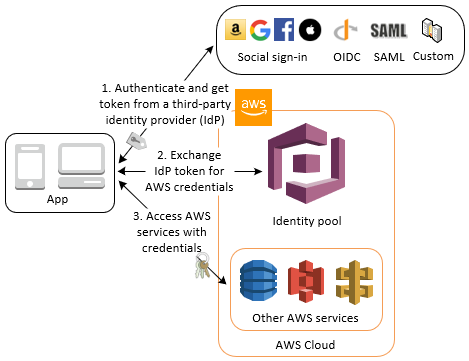
There is a User Pool (CUP) function that provides app users with a login function by giving them an ID, and an Identity Pool function that provides AWS Credentials to provide direct access to AWS resources. Unlike IAM, this is authentication for users outside of AWS.
Cognito User Pool (CUP) - authentication
This function creates and authenticates a serverless database to access the application. We provide simple login with username and password, or authentication using email, phone authentication, MFA, JWT, etc. It provides various integration functions, such as receiving a token using Cognito and making an API Gateway request, or simply sending a request to ALB and having Cognito authenticate it.
- Lambda Triggers
Cognito Identity Pool (CIP) - authorization
Provides temporary qualifications (permissions) to the user. Identity Pool includes Public Provider, CUP, OpenID, and SAML Identity Pool. Users who receive temporary credentials can access AWS resources directly or make requests using API Gateway.
Other Serverless Services
Step Function
It is a serverless workflow service that connects multiple AWS services to define and execute automated processes. State Machine (aka. workflow) executes Lambda, DynamoDB, SNS, or other workflows depending on the task state. Corresponding to each block

States
-Choice State
- Fail or Succeed State
- Pass State
- Wait State
- Map State
- Parallel State - State for parallel execution
{
"StartAt":"CallLambda",
"States":{
"CallLambda":{
"Type":"Task",
"Resource":"arn:aws:states:::lambda:invoke",
"Parameters":{
"FunctionName":"arn:aws:lambda:us-east-1:123456789012:function:MyFunction"
},
"End":true
}
}
}
Standard vs Express
By default, Standard Step Function can last up to 1 year, and when applying Express Step Function, which has a workflow of up to 5 minutes, there are asynchronous workflows such as synchronous execution and messaging that require fast response. Standard Workflow is more expensive than Express and is suitable for workflows that are complex and require long execution times. ###AppSync It is a GraphQL-based API service that provides a managed service that provides real-time and offline data to client applications. Easily integrate and serve data from multiple resources, and GraphQL allows you to specify the type and amount of data based on client requests, unlike REST APIs. Supports serverless WebSocket with Pub/Sub API. You can back up AppSync with DynamoDB.
query listTodos {
getTodo(id: "") {
description
id
name
when
where
}
Amplify
It is a serverless platform that helps you develop and deploy mobile and web applications quickly and easily. It provides a variety of functions including front-end development, back-end services, and hosting. You could say it's Elastic Beanstalk for mobile and web apps. You can use the Cypress test framework by integrating it using the amplify.yml file. You can receive UI test reports using Cypress tests.