Part 9. AWS - Lambda at a glance
Interest in Serverless is also increasing, and since there is no need to manage it directly, it is possible to develop applications that focus more on the code itself.
AWS Lambda
It scales automatically and is on-demand, billing only when it runs. Most languages are provided, and languages such as Rust and Golang also have community support. Provides integration with other AWS services (mainly Node.js and Python). For example, serverless operation is possible by obtaining static content from S3 and CloudFront, logging into Cognito, and calling Lambda functions through API Gateway.
- The first 1,000,000 requests are free, but each subsequent request costs $0.0000002.
- You can get the first 400,000 gigabytes of compute time for free each month, and of course consumption will vary depending on RAM size. After that, it costs $1 per 600,000 GB.
- In the Lambda Function's configuration settings, the memory can be changed between 1GB and 28GB. The more memory you have, the more CPU you can use. CPU cannot be set separately.
Synchronous Invocations
In a synchronous call, the client must wait for a response and find a solution to the error. Synchronous testing can be done with CLI or SDK, but HTTP and HTTPS endpoints can be applied using ALB. At this time, Lambda needs to be set as a target group.
- If there are Multi-Header values, they are converted to json query parameters and passed to Lambda.
"queryStringParameters": {"name":["alb", "lambda"]}
Asynchronous Invocations
An example of an asynchronous call is when a new file enters the S3 Bucket and an SQS event occurs and the Lambda service operates.
- Services that provide asynchronous services
- S3, SNS, CloudWatch Events / EventBridge, CodeCommit, CodeCommit, IoT, etc.
- Error handling is possible using SQS DLQ (Dead Letter Queue).
Event Source Mapping
Event Source Mapping is a Lambda resource for indirectly invoking a function with a batch of records from a stream or queue-based service.
- Unused triggers should be deleted to prevent polling costs.
Differences from Trigger
Trigger is suitable for calling Lambda events for individual events and matters that need to be processed in real time. Triggers are actually stored and managed by the service that generates the event, not by Lambda. On the other hand, Event Source Mapping is a Lambda resource created and managed within the Lambda service. Allows batch processing of streaming data or messages.
Streams (Kinesis, DynamoDB)
Kinesis and DynamoDB process items in shard level order. Executed items are not deleted from the stream and can be read by other consumers.
- Up to 10 batch processors are possible per shard, and keys within the shard are read in order.
- Errors are retried until success. To prevent unnecessary retries, you can delete old events (move to destination) or limit the number of retries.
Queue (SQS, SQS FIFO)
Likewise, for record processing using Event Source Mapping, you can specify the batch size in the queue and also set the DLQ. At this time, DLQ is applied in SQS creation for synchronous processing, not Lambda. (DLQ settings for asynchronous processing in Lambda settings)
- SQS adds 60 instances per minute by default and processes up to 1,000 messages per second simultaneously.
- In SQS FIFO, the number of Lambda functions for queue processing is equal to the number of active message groups.
###Context Objects
When Lambda receives information about an event, it receives an Event Object and Context Object. You can see this by writing a function like def def lambda_handler(event, context). Here, the Event Object can be said to be data from another resource, and the Context Object contains Lambda metadata. The two objects are complementary and are expressed in json format.
You can check the information in the context as shown in the example code below. It provides methods for calling data and the runtime environment, and allows you to obtain information about AWS request ID and function name memory limits in megabytes, etc.
import time
def lambda_handler(event, context):
print("Lambda function ARN:", context.invoked_function_arn)
print("CloudWatch log stream name:", context.log_stream_name)
print("CloudWatch log group name:",  context.log_group_name)
print("Lambda Request ID:", context.aws_request_id)
Lambda Configurations
Destinations
It is recommended to use Destinations rather than DLQ. This is because data about success and failure can be sent not only through SNS and SQS, but also through Event Bridge.
Event Source Mapping is only used when there is a batch of events but they cannot be processed and are discarded.
(I looked this up, but I don't understand it accurately. I don't think Event Source Mapping's main function is to dispose of event batches.)
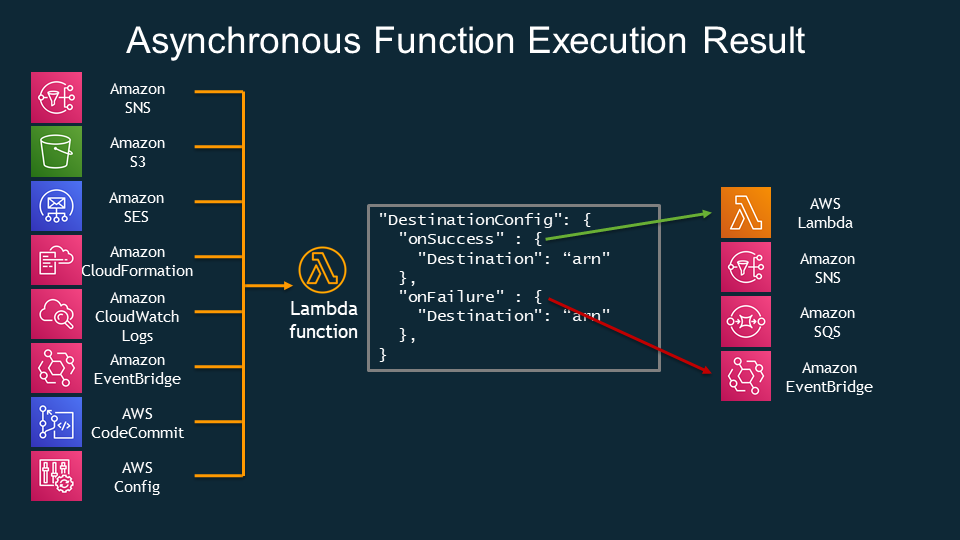
Permissions
By granting execution permission, you can allow access from other resources and access to the resource. For example, if your function needs to access DynamoDB, you will need the AWSLambdaDynamoDBExecutionRole managed policy. Since Lambda calls SQS, execution permission for SQS must be applied to Lambda.
You need to use IAM Access Analyzer to apply a least-privilege policy that grants only the necessary permissions. Best practice is to grant one execution permission per function.
Environment Variables
You can create environment variables in Configuration to apply variables needed for security keys or Lambda functions.
Logging & Monitoring
Lambda integrates with CloudWatch logs and stores them automatically. You can use X-Ray by activating trace in the section where you add monitoring tools in Configure. You can use AWS_XRAY_DAEMON_ADDRESS to communicate with the X-Ray daemon.
Lambda Storage
/tmp
If you are running Lambda in a VPC, you can access EFS and mount it as a local directory. You can temporarily use /tmp storage, in which case content can be applied dynamically and is charged at the Lambda cost.
Lambda Layer
Using Lambda Layer, you can place the libraries required for external dependencies in a layer and make them available to other packages as well. In other words, it is efficient because there is no need to deploy the library together every time. It provides 5 layers per function and has a maximum limit of 250MB. It can only store persistent or static content. Of course, this is also billed as Lambda cost.
- This is an effective way to reduce compilation time due to dependencies.
S3
There is no size limit, data is stored permanently and dynamic content archiving is possible. It is saved in Object format.
EFS
There is no size limit, data is stored permanently and dynamic content archiving is possible. It is saved in FS format. IAM and NFS permissions must be applied.
Lambda and Concurrency
Up to 1,000 functions can run simultaneously. Calls at concurrency thresholds cause throttling. For synchronous calls, a ThrottleException is thrown; for asynchronous calls, it will retry or go to DLQ. The thing to note about limit here is that the concurrency limit applies to all functions in the account.
Provisioned Concurrency
When a new instance is launched, many new init processes occur and this process can take some time (Cold Starts). Therefore, initial requests may experience additional delays. At this time, you can prevent delays due to Cold Starts by allocating concurrency before calling the function using Provisioned Concurrency.
Container Image
Lambda supports using container images. You can deploy to Lambda through ECR using the Lambda Runtime API. As a best practice, it is recommended to use the base image provided by AWS, use multi-stage build, and use a function with multiple layers using one repository.
ETC
Lambda@Edge
CloudFront functionality allows you to run functions closer to users. It is used to change CloudFront requests as triggers and respond to Viewer Requests and Origin Requests. Unlike the CloudFront function, it supports Node.js and Python runtimes, and although the speed is somewhat slow, network access and request body access are also possible. We do not offer a free tier.
Lambda & VPC
Lambda resides within a VPC owned by AWS by default. To access the private subnet, Lambda goes through ENI (Elastic Network Interface). Alternatively, you can use VPC Endpoint. Internet access requires NAT gateway or NAT instance, which provides access to external APIs.
External Dependencies
If you need external dependencies, zip them together with your code and upload them to Lambda for anything less than 50 MB, or to S3 for anything larger.
Version & Alias
You can create multiple versions using a Lambda function and apply the most recent version as $LATEST. Using alias has the advantage of being able to use prod and dev environments separately for each function and changing the version ratio within each alias. In other words, by moving some traffic to the latest version before deployment, it can be reflected gradually during deployment. (+ CodeDeploy)
with CloudFormation
You can create Lambda functions using CloudFormation templates. Zip the code, upload it to an S3 bucket, and write the object to AWS::Lambda::Function.
lambda/function.zip
with CodeGuru
I use CodeGuru to get information about Lambda runtime performance. To use CodeGuru, use AmazonCodeGuruProfilerAgentAccess.
Function URL
This is a function that creates a URL endpoint without any separate settings such as ALB or API Gateway in order to execute Lambda functions through URL access. Both IPv4 and IPv6 are supported, and access is possible only using the public Internet.
Add AWS account execution permission
To grant other accounts permission to execute Lambda functions, Lambda Resource-based Policy and Cross-account IAM Role must be applied.
AWS Lambda Best Practices
- It is recommended to execute tasks that require a large role, such as DB connection, outside of the Lambda function handler.
- It is recommended to use environment variables to specify variables necessary for DB connection.
- Sensitive information such as passwords are encrypted using KMS.
- Reduce deployment packages and use Layer for dependencies that are also used in other packages.
- span style="background-color:#fff5b1">Know AWS Lambda limits.
- Performance criteria
- Memory allocation: 128MB – 10GB (1MB increments)
- Maximum execution time: 900seconds (15minutes)
- Environment variable size: 4KB
- If excess environment variables are needed, apply them as a
.zipfile. /tmpdisk capacity of function container: 512 MB to 10GB (10,240MB)- Number of concurrent executions: 1,000
- Distribution criteria
- Lambda function deployment size: 50MB
- Size when unzipped: 250MB
- Avoid using repetitive code and be careful not to have the Lambda function call itself again.