CS basics summarized with a backend roadmap [1-1] Internet
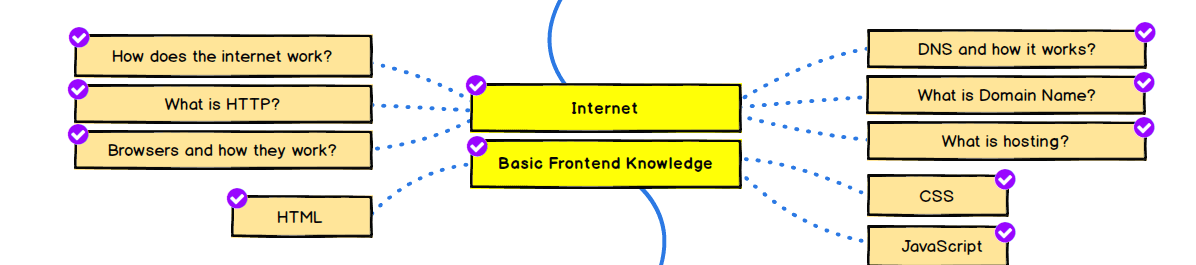
What is the Internet?
It refers to a computer network system that provides data communication services such as long-distance access, file transfer, and e-mail throughout the world. It originated from the word ‘inter-network’, and now refers to a communication network that connects computers around the world. The Internet consists of clients and servers, and is provided with a basic protocol called TCP/IP.
How the Internet Works
Transmission for satellites is highly likely to cause delays as it transmits over huge distances.
Therefore, the operating principle of the Internet is to retrieve data stored on SSDs (which serve as the server's internal memory) within a data center through optical fiber cables. The optical pulse sent through the fiber optic cable is converted into an electrical signal at the router, and response data is received by the device through an Ethernet cable.
The client is not a server directly connected to the Internet, but is connected to an ISP (internet service provider) and can make requests to the server through the Internet. The ISP connected to the device assigns the device an IP address. And the data is delivered in the form of packets divided into small data units. The packet is sent to the next router through a nearby router and reaches the destination server or client IP.
What is HTTP?
HTTP stands for hyper text transfer protocol. A protocol that operates on a TCP connection basis. It is a protocol (convention) for exchanging information on the Internet. When a server sends a message containing information about a client's request, it is called an HTTP message. Through HTTP communication, the client exchanges information in the form of HTML, JSON, XML, etc. as specified.
Because HTTP is a protocol that does not maintain a connection, it operates in a request/response manner. Therefore, it responds to the request all at once and disconnects when the response is finished. The handshake that occurs depending on the connection can also cause overhead.
HTTP message
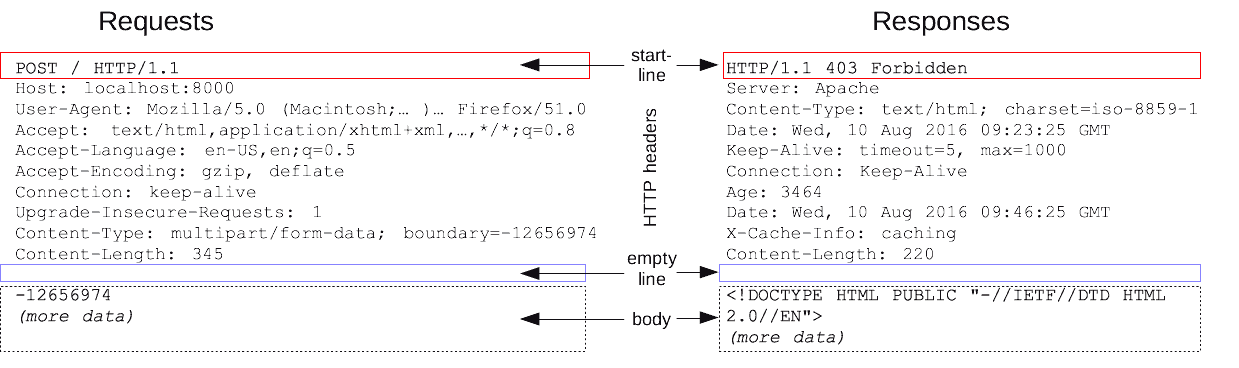
HTTP messages are divided into a start line (first line), header, and body. Message types are divided into two types depending on request and response.
Requests HTTP message
The start line contains the type of request such as GET, DELETE, PUT, and POST, the site address, and the HTTP version. The header contains information about the request, and the body contains data to be sent along with the request.
Responses HTTP message
The start line is also called the status line, and is divided into the protocol (HTTP) version, status code (success or not), and status text.
Then there are the response headers and body (which may be omitted).
HTTP/2 frames
It can solve the wasteful inefficiencies of the HTTP/1.x version. With the advent of HTTP/2, problems such as header compression and repeated transmission of similar headers in consecutive messages were solved, and multiple transmission became possible. Improved performance!
Multiplexing is possible without the need to connect multiple requests, allowing parallel processing and, unlike pipelining, solving the HOL problem.
A server push function has been added that provides necessary resources without a request.
Stream: A bidirectional flow of bytes transmitted within a configured connection, in which one or more messages may be transmitted. Message: An overall sequence of frames that map to a logical request or response message. Frame: The minimum unit of HTTP/2 communication, and each minimum unit includes one frame header. At a minimum, identifies the stream to which the frame belongs.
server and client
A server is a system on a network that manages access to certain data, and a client is a program that can access data. In other words, it is a requester for service information.
browser
Web browser is a general term for applications for searching and viewing WWW-based Internet content, such as HTML documents, pictures, and multimedia files. It is an application software based on a graphical user interface. Major web browsers include Google Chrome, Firefox, Edge, Internet Explorer, Opera, and Safari.
The first web browser was invented by Tim Berners-Lee in 1990. The name changed from World Wide Web to Nexus.
Structure of the browser
Browsers are divided into user interface, browser engine, rendering engine, UI backend, JavaScript interpreter, and data storage.
Here, the rendering engine can display documents and images such as HTML and CSS by displaying the requested content on the browser screen. Firefox uses the Gecko engine created by Mozilla, while Safari and Chrome use the Webkit engine.
How browsers work
The browser communicates using HTTP, which the web server uses to display web pages. Browsers interpret and display HTML files according to HTML and CSS specifications, and these specifications are set by W3C (World Wide Web Consortium), a web standardization organization.
Rendering engine operation process
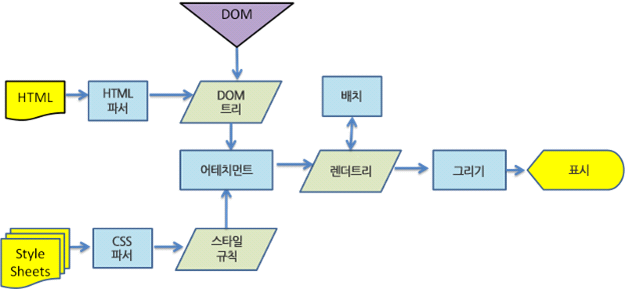
The requested content is displayed in the browser through the process of parsing HTML for DOM tree construction and building, placing, and drawing the render tree. Each process is not carried out sequentially after the entire process is completely completed, but the construction, placement, and drawing process begins from the parsed part.
farthing
Here, parsing refers to converting the code into a structure that the browser can understand and use. The parsing result is usually a node tree representing the document structure, which is called a parsing tree or grammar tree. The document goes through lexical analysis and syntactic analysis by the parser. The created parsing tree is converted into machine code through a conversion process.