[JDBC] DAO, DTO Concepts and DML Code Structure
Continuing from the previous article, we summarized the practical use of DML queries using JDBC.
How should we configure program when importing information from Oracle into JDBC? First of all, I think it would be better to grasp the concepts of DAO and DTO among the MCV patterns first.
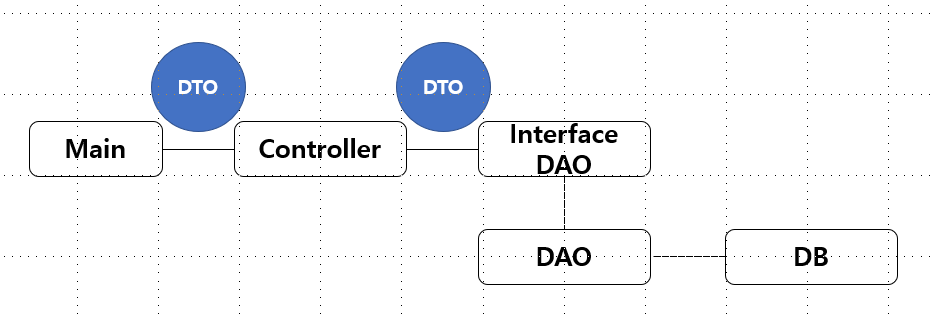
As shown in the picture, starting with the Main execution class, it can be divided into Controller, which manages execution menus, and DAO, which executes SQL statements and handles detailed methods. At this time, a DTO that transfers the property values of the object exists. This is a software design format.
So what are DAO and DTO?
DAO Data Access Object / DTO Data Transfer Object (= VO Value Object)
DAO is an object with a kind of Connection Pool rather than making a connection every time a connection to retrieve information from the DB occurs, and is a means of preventing overhead. Simply put, as an example, DAO can be said to be an object that contains methods that connect to the DB and retrieve the member list if the value executed in the menu viewed by the user is member inquiry.
On the other hand, DTO is called Java Beans for data exchange between layers. It is an object composed of property values to be passed for inter-layer data connection and getters and setters.
Then, if you want to view JBDC member information using the actual DB in Oracle, how should you configure code?
I would like to explain by looking at the code structure for each class.
(The examples below are for illustrative purposes only, so developers can freely write code for each class.)
To explain according to the graph above, there will be a menu of the execution part in Main. The code structure is roughly as follows, creating a Controller object and allowing the Controller method to be executed.
|
1
2
3
4
5
6
7
8
9
10
11
12
13
14
|
import java.util.*;
public class Main {
public static void main(String[] args) {
Controller ct = new Controller();
Scanner sc = new Scanner(System.in);
ct.menu(sc);
sc.close();
}
}
|
cs |
The important thing here is the Controller object. It allows most rough methods to be connected, and the overall program structure is created here.
In the code below, only the core parts were written, excluding variable processing for input values (letter input other than Y, N, etc.). The Controller method menu(sc); executed in Main is a menu that asks whether to search for members. If Y is input here, the next method showInfo(sc); is executed. showInfo(sc); The method is defined below and receives the value from DTO in list format (getter) and outputs it.
List
Here, udao is an object of userDAO, and you can see that the return value is in List
|
1
2
3
4
5
6
7
8
9
10
11
12
13
14
15
16
17
18
19
20
21
22
23
24
25
26
27
28
29
30
31
32
33
34
35
|
import java.util.*;
public class Controller {
· interUserDAO udao = new userDAO();
String menuNo;
· public void menu(Scanner sc) {
System.out.@@T407 @@println("회원을 조회하시겠습니까? [Y/N] “);
String answer = sc.nextLine();
switch(answer) {
case "Y":
showInfo(sc);
case "N":
showMenu(sc);
}
}
private void showInfo(Scanner sc) {
List<userDTO> userList = udao.showInfo();
if(userList.size()>0) {
for(userDTO noon : userList) {
System.out.println("회원명 나이 성별 전화번호 이메일");
System.out.println(noon.getName() noon.getAge() noon.getGender() noon.getMobile() noon.getEmail());
}
} else
System.out.println("회원이 없스트.")
}
}
|
cs |
Transfer is the same as the getter, setter is the same. DTO Geist East static I'm going to do this I'm going to go to I'm going to be I'm going to be I'm going to be I'm going to be I'm going to be I'm going to be I'm going to be I'm going to be I'm going to be I'm going to be I'm going to be I'm going to be able to do this I'm going to be able to do this I'm going to be able to do this.
interfaceDAO, it was created as a class interDAO for implementation when creating a userDAO object in the Controller. In other words, when you create a method in the Controller, an abstract method that defines the method is created in the interface, as shown below. Now it is finally time to override the abstract method of interface in DAO. This is a class that is connected to actual SQL statements. First, List Then, let's look at the code structure of the DAO class. As you can see from the previous link below, the code that applies SQL statements to Eclipse is written.
cs
cs
cs
cs